Have you submitted your FBR income tax return after the due date but your name is still not appearing on the Active Taxpayer List (ATL)?
You may need to pay the FBR ATL surcharge under Section 182A of the Income Tax Ordinance, 2001 to become eligible for inclusion in the relevant Active Taxpayer List.
Following the Finance Act 2026, the statutory ATL surcharge increased significantly for individuals, Associations of Persons (AOPs) and companies.
In this step-by-step guide, AsaanTax.pk explains how to generate an ATL surcharge PSID using FBR IRIS 2.0, make payment through authorized banking channels, download the Computerized Payment Receipt (CPR), and verify your filer status.
We also explain the difference between an ATL surcharge and a late-filing penalty, the latest 2026 rates, common payment errors and an important statutory exception available to eligible individuals.
What Is FBR ATL Surcharge?
ATL stands for Active Taxpayer List, which is maintained by the Federal Board of Revenue (FBR).
The ATL identifies taxpayers who satisfy the relevant requirements for active taxpayer status.
When a taxpayer files an income tax return after the applicable filing deadline, payment of a surcharge under Section 182A may be required before the taxpayer is included in the relevant ATL.
The ATL surcharge is different from ordinary income tax payable on salary, business income, rental income or other sources.
Important: Submitting a late tax return does not necessarily mean that the taxpayer's ATL status becomes active immediately.
The taxpayer must satisfy the applicable statutory requirements, which may include payment of the ATL surcharge.
Latest FBR ATL Surcharge Rates in Pakistan – 2026
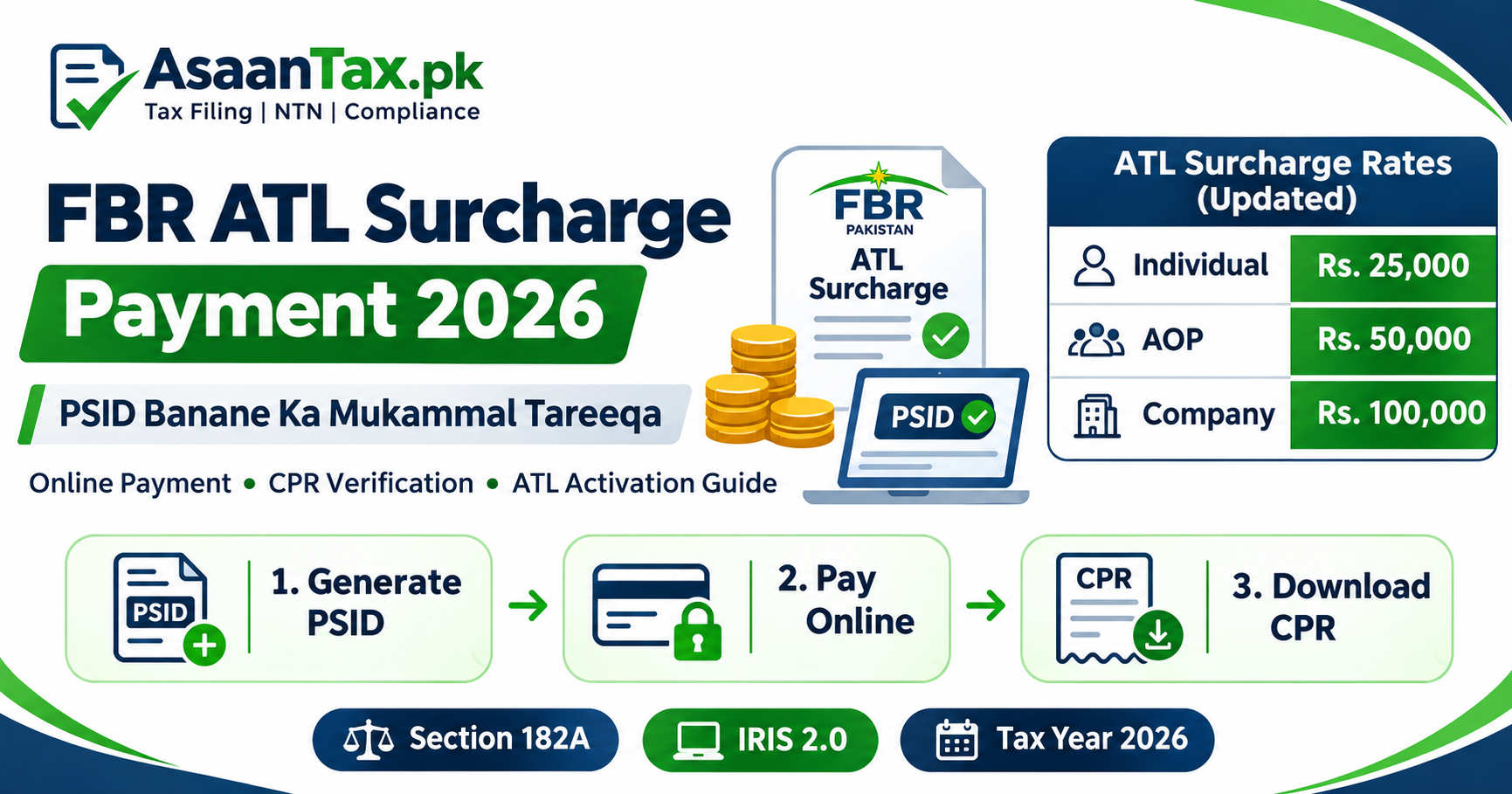
The Finance Act 2026 amended Section 182A of the Income Tax Ordinance, 2001 and increased the surcharge amounts for late inclusion in the Active Taxpayer List.
| Taxpayer Category | Previous ATL Surcharge | Updated ATL Surcharge |
|---|---|---|
| Individual | Rs. 1,000 | Rs. 25,000 |
| Association of Persons (AOP) | Rs. 10,000 | Rs. 50,000 |
| Company | Rs. 20,000 | Rs. 100,000 |
These amounts are the statutory ATL surcharges applicable under the amended law, subject to relevant requirements and exceptions.
Legal reference: Section 182A of the Income Tax Ordinance, 2001, as amended through the Finance Act 2026.
Some older FBR explanatory webpages may still show previous amounts. Taxpayers should follow the current legislation and verify their payable amount before generating a PSID.
Who Needs to Pay ATL Surcharge?
ATL surcharge may apply to taxpayers who submit a required income tax return after the applicable due date and seek inclusion in the relevant Active Taxpayer List.
Examples can include:
- Salaried individuals who filed their required returns late.
- Business owners who submitted overdue returns.
- Self-employed professionals who filed after the deadline.
- Freelancers who missed their applicable return filing deadline.
- Associations of Persons filing late.
- Companies filing after their applicable statutory deadline.
However, not every taxpayer who is currently inactive necessarily needs to pay the surcharge.
A person may appear inactive because of a missing return, incorrect tax year, filing or processing issue, or another compliance requirement.
Before paying, verify your return filing history, relevant tax year and current ATL status.
What Is a PSID in FBR?
PSID stands for Payment Slip ID.
It is a unique payment reference generated through FBR's electronic payment system.
A PSID is used to identify a particular tax payment and its relevant details.
FBR's IRIS 2.0 ePayment facility allows taxpayers to generate payment slips for different tax categories.
Examples include:
- Income tax payments.
- Advance income tax.
- Demanded income tax.
- Miscellaneous income tax payments.
- Other applicable federal tax payments.
For ATL surcharge, FBR's published payment guidance identifies the Misc. payment nature as the relevant category.
Do not accidentally generate an ordinary annual income tax payment when your intended payment is specifically an ATL surcharge.
How to Generate FBR ATL Surcharge PSID – Step-by-Step Guide
The following procedure explains how to create an ATL surcharge payment slip.
The exact appearance and labels of the IRIS portal may change as FBR updates its system.
Step 1: Open FBR IRIS 2.0
Visit the official FBR portal:
You can also access the current electronic payment facility at:
https://iris.fbr.gov.pk/payment
Use the official FBR website rather than an unknown third-party payment page.
Step 2: Log In or Open the e-Payment Facility
Depending on the payment workflow, taxpayers may be able to generate a PSID through the electronic payment facility without completing the full logged-in return-filing process.
If the system asks you to sign in, use your registered IRIS credentials.
Never share your IRIS password or one-time verification code with an unauthorized person.
Step 3: Select Income Tax
Open the e-Payments or payment creation section.
Select Income Tax as the relevant tax category.
The portal may display payment categories such as:
- Admitted Income Tax.
- Advance Income Tax.
- Demanded Income Tax.
- Misc.
Step 4: Select Miscellaneous Payment
For ATL surcharge, select the Misc. category or the specific ATL surcharge option provided by the current portal.
FBR's official payment guidance refers to Tax Payment Nature Misc for surcharge payment under Section 182A.
Where the portal requests a further payment description or head, select the correct category corresponding to ATL surcharge.
Do not choose a penalty, ordinary advance tax or another payment head simply because the amount appears similar.
Step 5: Enter Your Registration Details
Provide the taxpayer identification details requested by FBR.
For individuals, this may include CNIC or the registered identification number.
For an AOP or company, the relevant NTN or registration details may be required.
Check that the displayed taxpayer name matches your official FBR record.
If the name or registration details are incorrect, resolve the issue before proceeding.
Step 6: Select the Relevant Tax Year
Choose the tax year for which the ATL surcharge is applicable.
For example, a taxpayer filing an overdue Tax Year 2026 return should select the relevant tax year indicated by the current FBR payment process.
The tax year must match the payment's intended purpose.
Selecting the wrong year can cause reconciliation and verification problems.
Step 7: Confirm the Applicable Surcharge Amount
Check the taxpayer category and the latest statutory amount.
The amended amounts are:
- Individual: Rs. 25,000.
- AOP: Rs. 50,000.
- Company: Rs. 100,000.
Before proceeding, check whether a statutory exception applies and whether the system requires any additional information.
Step 8: Generate the PSID
Review the entered information, including:
- Taxpayer name.
- CNIC or NTN.
- Relevant tax year.
- Payment category.
- Payment amount.
Confirm the details and generate the PSID using the portal's available button.
Save or print the generated payment slip.
Step 9: Pay the PSID
Use one of the authorized payment channels supported for the generated PSID.
Step 10: Obtain Your CPR
After successful payment processing, obtain the official Computerized Payment Receipt.
Keep the CPR and payment reference for verification.
Step 11: Check Your ATL Status
After completing the required filing and surcharge steps, check the official FBR Active Taxpayer List verification service.
Your status may not update at the exact moment of payment.
If it remains inactive, verify that the payment and the relevant tax return have both been correctly recorded.
How to Pay FBR ATL Surcharge PSID Online
Once the payment slip has been generated, the available payment methods may include:
1. Internet Banking
Log in to your participating bank's internet banking service.
Look for the relevant government payment or FBR tax payment option.
Enter the PSID and verify the payment details before authorizing the transaction.
2. Mobile Banking
Open your participating bank's official mobile application.
Locate the supported FBR or government tax payment service.
Enter the PSID and complete the payment after checking the taxpayer details and amount.
3. ATM
Some participating banks support government tax payments through ATMs.
Follow the bank's available payment instructions and enter the PSID where required.
4. Bank Branch
A taxpayer may also use an authorized bank branch where the relevant PSID payment facility is supported.
Carry or provide the generated payment slip and identification details required by the bank.
Important: The exact channels available can depend on the bank, tax payment category and current FBR payment system.
Never transfer ATL surcharge funds to an individual's personal bank account.
What Is a CPR in FBR?
CPR stands for Computerized Payment Receipt.
It is the official electronic record confirming that a payment has been received and recorded through the relevant tax payment system.
A CPR can include:
- Taxpayer information.
- Payment reference.
- Amount paid.
- Payment date.
- Tax category.
- Relevant payment identification details.
FBR's ePayment 2.0 system provides electronic payment confirmation and CPR access through the payment record facilities.
A generated PSID and a completed CPR are not the same.
PSID = Payment instruction/reference.
CPR = Payment completion record.
Generating a PSID without completing the payment does not mean that the surcharge has been paid.
How to Download or Verify FBR CPR
To verify your payment:
- Open the official FBR IRIS portal.
- Access the payment search or verification facility.
- Enter the relevant PSID or payment details.
- Check whether the payment shows as completed.
- Open or download the available CPR.
- Retain it with your income tax records.
If the amount was deducted from your bank account but the portal does not show a completed payment, investigate the transaction status before making another payment.
How to Check Filer Status After ATL Surcharge Payment
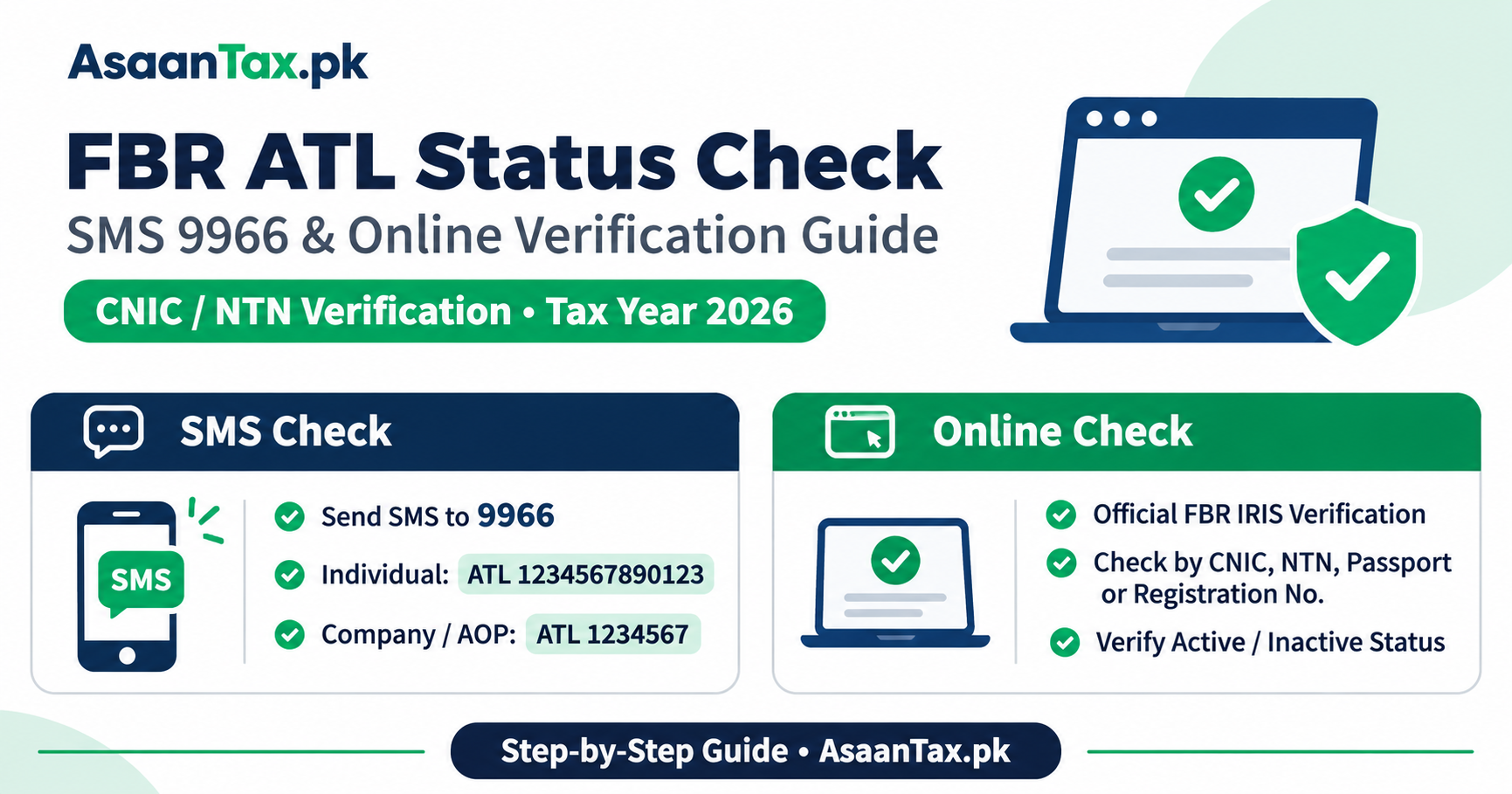
FBR provides an Active Taxpayer List verification service.
Follow these steps:
- Visit https://iris.fbr.gov.pk/
- Select the Active Taxpayer List (Income Tax) verification option.
- Choose CNIC, NTN or another supported identification type.
- Enter your registration details.
- Complete the required verification.
- Review your current ATL status.
Check the relevant tax year where the system provides that information.
A payment receipt is evidence of payment, but the official ATL verification result establishes the status shown in FBR's system.
How Long Does ATL Status Take to Update After Payment?
There is no universal guarantee that every taxpayer's status will become active immediately after paying a PSID.
Processing time can depend on:
- Confirmation of payment.
- Taxpayer registration information.
- Correct tax year.
- Successful filing of the relevant return.
- Current ATL update processes.
- Any unresolved compliance or payment reconciliation issues.
If your status does not change, first verify the CPR and return filing acknowledgment.
Avoid repeatedly generating new payment slips without establishing whether the original payment was successful.
Is ATL Surcharge the Same as a Late-Filing Penalty?
No.
There is an important distinction between the two.
ATL Surcharge – Section 182A
The surcharge relates to eligibility for inclusion in the Active Taxpayer List after filing a return late, subject to statutory conditions.
Late-Filing Penalty – Section 182
Section 182 contains separate penalties for specified failures to comply with tax filing and other legal obligations.
A taxpayer may be subject to a late-filing penalty depending on the applicable provisions and determination process.
Outstanding Income Tax
A taxpayer may also have unpaid income tax resulting from the return itself.
Therefore, the total amount payable can include different legal liabilities.
| Payment Type | Relevant Provision | Purpose |
|---|---|---|
| ATL surcharge | Section 182A | Late inclusion in ATL |
| Late-filing penalty | Section 182 | Applicable filing non-compliance |
| Outstanding income tax | Relevant charging and payment provisions | Tax liability |
| Default surcharge | Section 205, where applicable | Late payment of relevant tax |
Do not assume that paying the ATL surcharge automatically clears every other tax liability.
Important Exception – Six-Month Property Undertaking
The Finance Act 2026 introduced an important provision under Section 182A(3).
Under this provision, the condition of paying the ATL surcharge does not apply to an individual who furnishes the prescribed undertaking before the Commissioner declaring that the person will not purchase, acquire or otherwise obtain ownership or beneficial interest in any property for six months from the date of furnishing the undertaking.
This is a conditional statutory exception.
Important Points
- The exception is specifically provided for an individual.
- The prescribed undertaking must be furnished to the relevant Commissioner.
- The six-month restriction concerns acquiring ownership or beneficial interest in property.
- The required form and procedure must be followed.
- The exception is not an automatic waiver for every late filer.
A taxpayer should carefully consider the restriction before relying on this provision.
Do not pay a surcharge without first checking whether you qualify for an applicable statutory alternative.
What Happens If a PSID Is Generated With the Wrong Tax Year?
A payment slip generated for an incorrect tax year may create reconciliation problems.
Before making payment, check whether the PSID can be cancelled or corrected through the available payment facility.
If payment has already been completed, the correction process may require contacting FBR or following the current adjustment or correction procedure.
Do not assume that changing the tax year in your income tax return automatically changes an already completed payment record.
What Happens If Money Is Deducted but CPR Is Not Generated?
If your bank account shows a successful debit but FBR does not display a CPR:
- Check the banking transaction status.
- Search for the PSID in the official payment verification facility.
- Confirm whether the transaction is pending, received or completed.
- Keep your bank transaction reference.
- Contact the bank or relevant FBR support channel if required.
- Avoid immediately making a duplicate payment.
The final resolution depends on the actual payment status.
Can You Generate an ATL Surcharge PSID on Mobile?
Yes. FBR provides electronic tax payment facilities accessible through supported online and mobile workflows.
The Tax Asaan application also includes payment-slip generation functionality, subject to its currently supported options.
The process generally involves selecting the payment type, entering taxpayer information and generating the relevant payment reference.
However, interface options may vary between the web portal and mobile application.
Always use official FBR services.
Common Mistakes While Paying ATL Surcharge
Taxpayers frequently make avoidable errors during payment.
Examples include:
- Selecting the wrong tax year.
- Entering an incorrect CNIC or NTN.
- Choosing ordinary annual income tax instead of the relevant ATL surcharge head.
- Paying an outdated surcharge amount.
- Ignoring a legally available exception.
- Assuming PSID creation means payment is complete.
- Failing to save the CPR.
- Paying twice because the status has not updated immediately.
- Attempting to obtain active status without filing the relevant return.
- Assuming that an ATL surcharge payment settles a separate late-filing penalty.
Taking a few minutes to verify the details before payment can help avoid unnecessary correction procedures.
How to Become an Active Taxpayer After Filing Late
If you have missed your applicable return filing deadline, the correct general process is:
Step 1: Identify the Required Tax Return
Determine which tax year's return is required.
Step 2: Prepare and File the Return
Submit the complete income tax return through FBR IRIS, including the required wealth statement where applicable.
Step 3: Verify Whether ATL Surcharge Applies
Review the statutory requirements and any relevant exception.
Step 4: Generate the Correct PSID
Use the appropriate FBR Income Tax Misc. payment facility.
Step 5: Complete the Payment
Pay using an authorized channel and retain the CPR.
Step 6: Verify ATL Status
Check the official Active Taxpayer List.
Step 7: Resolve Any Remaining Issues
If your name does not appear, review the return, payment details and any other applicable requirements.
Why Is Active Taxpayer Status Important in Pakistan?
Appearing on the Active Taxpayer List can affect the withholding tax rates applied to various transactions.
Depending on the applicable legislation, these may include:
- Purchase of immovable property.
- Sale or transfer of property.
- Registration or purchase of vehicles.
- Certain banking transactions.
- Selected investment receipts.
- Other transactions subject to ATL-based withholding rules.
The applicable rate depends on the relevant transaction and current law.
ATL membership does not automatically eliminate income tax or guarantee a refund.
How AsaanTax.pk Can Help With ATL Surcharge and FBR Filing
Having difficulty creating an FBR ATL surcharge PSID?
Not sure which tax year or payment category to select?
AsaanTax.pk provides professional assistance with income tax return filing, FBR registration, ATL verification and tax compliance procedures.
Our services include:
- NTN registration assistance.
- FBR IRIS account guidance.
- Income tax return preparation and filing.
- Late income tax return filing assistance.
- ATL surcharge eligibility guidance.
- PSID generation assistance.
- CPR verification guidance.
- Active Taxpayer List status review.
- Wealth statement preparation.
- General FBR compliance support.
Our team can assist you in understanding the relevant procedures and organizing the documents needed for accurate filing and payment.
Need Help Becoming an Active Taxpayer?
Visit AsaanTax.pk for assistance with your income tax return, ATL status and FBR payment requirements.
Website: https://www.asaantax.pk/
AsaanTax.pk is an independent tax services provider and is not an official website of the Federal Board of Revenue or the Government of Pakistan.
Official Sources and References
- FBR – IRIS 2.0
- FBR – e-Payment Facility
- FBR – Active Taxpayer List
- FBR – Pay Income Tax Guide
- FBR – Finance Act 2026
- FBR – ePayment 2.0 Announcement
- FBR – Online CPR and PSID Verification
Last updated: November 3, 2026.
Disclaimer: This article is for general educational purposes. Surcharge amounts and payment procedures depend on the current law, taxpayer classification, tax year and applicable exceptions. Before making payment, verify the correct payment category, amount and statutory requirements through official FBR resources. This article does not replace professional advice based on an individual taxpayer's circumstances.